Natasha’s Law

The food and information amendment (Natasha’s Law) will come into effect in October 2021.

It will require businesses to provide a full list of ingredients and allergen labelling on prepacked food for direct sale.

This new law is being introduced to protect allergy suffers. You may have read about PPDS (Prepacked for Direct Sale) before, these items will need to clearly show the name of the food along with the full ingredients.

All allergenic ingredients will need to be emphasised (bold, italic or a different colour). PPDS foods are foods which have been packed on site before being offered for sale. Items such as sandwiches, baguettes, prepared salads, items from a deli counter that have been prepacked and items such as sausages and burgers sold from your butcher counter.

You will need to make sure that your existing labelling hardware/software is capable of listing the ingredients and highlighting the allergies.

You may already have the correct hardware/software but you may need to look at ordering larger label stock to support the extra text.

Open Retail Solutions are authorised partners of both Avery Berkel and Bizerba and as such can offer help and guidance on the scales and put you in touch with the right people to help further.
Avery Berkel Logo

Bizerba Logo

Open Retail Solutions EPOS system has the option to print to zebra desktop printers.

Each of these can print multiple label formats so you can be sure that we can help you find the best suitable printer for the job.

Our software allows you the highlight text bold so all allergens can be highlighted correctly.

Once you are happy that you have carried out a review of your hardware/software you will need to make sure that your staff have been fully trained on the list of allergies so that they can offer guidance to your consumers.

Below are the 14 allergens that must be highlighted on your food labels.

Further information on Natasha’s Law can be found here https://natashas-law.com/

Bizerba EPoS Weigh Scale Integration

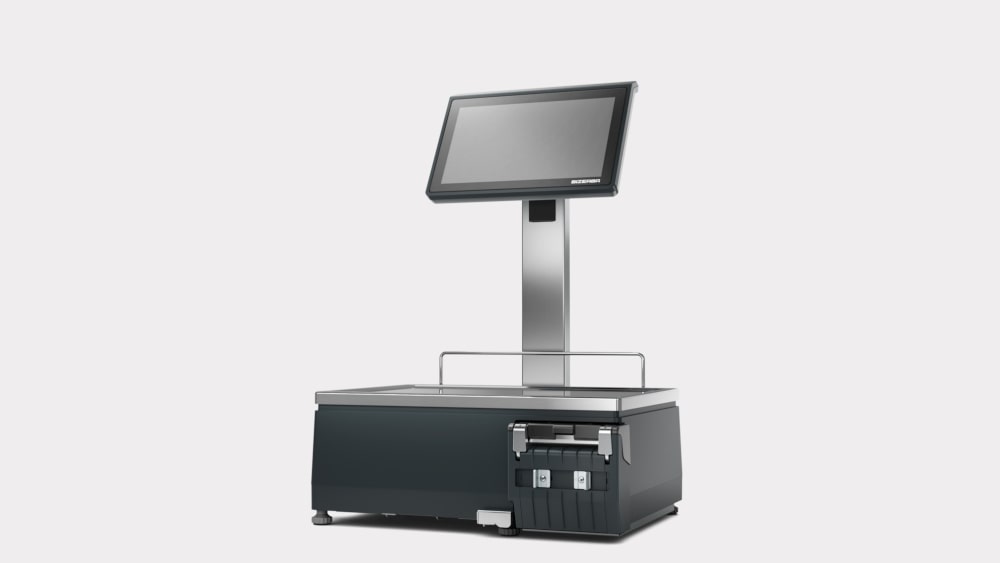
Bizerba XC 800

We can supply and integrate to three different Bizerba weigh scales.

We have integrated the product lines to our system so that if a price change or product description is changed this is sent directly to the scales without need to do any updating on the scale.

The simplest and cheapest scale model that we supply is the BCII. The scale offers 50 hot keys for the most regular selling lines and can label both weight and count lines.

The scale comes with a customer display that is conveniently positioned at a height that would normally show above most deli/butcher counters.

This scale can only print one label style but can print up to 4 additional lines of text on the label which can be used for things like ingredients or nutrition information.

The SCII scale also comes with the same 50 hot keys as the BCII scale, it can print multiple label style designs which can be useful when selling different types of product.

This scale also has the ability to add gradient pricing to a product.

This means that as the weight of a product line increases the price can reduce at set intervals.

This can also be used for count lines where the quantity entered is used rather than the weight.

The last and most expensive Bizerba scale that we can supply is the K Class.  This scale is fully touch screen and has all the features of the scales above.

The touch screen allows for multiple drill down hot keys which can be used to sell your product lines. This scale can also display screen text options which can be used for cooking instructions, ingredients, etc.

For more information on our EPoS solution please visit our website at http://www.openretailsolutions.co.uk or contact one of our sales team on 0115 9677439.

EPoS Labelling

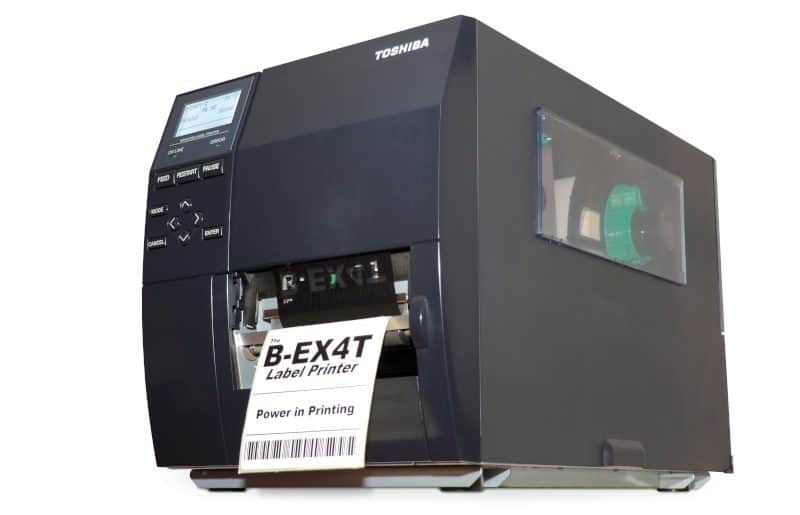
TEC B-EX4T1 300 DPI

Lots of products now come pre-barcoded helping retailers immensely. But for a variety of reasons there are still plenty of products which don’t.

This is where a good labelling solution comes into play to keep your EPoS system accurate.

Using our solution there is no need for any laborious typing of product descriptions, prices etc. All this information is pulled from the database. You just pick the products, the label style and quantity, hit print and you are ready to label. Not only saving lots of time, but totally eliminating any human error.

There is a mind-boggling amount of choices in the world of label printing, but we can narrow it down to the two most useful and reliable types here.

Thermal EPoS Label Printing

Firstly, thermal printing, either direct or transfer. Direct is when the data is burnt directly onto the label. Transfer is via an ink ribbon. Direct is cheaper as you don’t have to buy ribbon but is slower, so normally only for occasional use. Transfer is much quicker so usually for bulk printing.

TEC B-EX4T1 300 DPI

For large volumes we recommend the TEC B-EX4T1 300 DPI. This printer is ideal for large volumes of printing as you can print thousands of labels in a couple of minutes. The labels are clear and accurate, ideal for barcode scanning.

Smaller volumes or occasional use is becoming more popular, especially in farm shops and delicatessens. For this we recommend the Zebra GK420T. Again, we use this because of the clarity of print. The advantage of this printer is that it can print in both direct and transfer modes.

The main label types are sticky backed labels in various sizes, lock ties, dumbbells, and pot-pointer / stick in. The down side with thermal printing is you can only print black on to usually white but yellow also works well.

Laser EPoS Labelling

The final option is laser printing. This is for more colourful labels such as shelf edging, bed cards, colour lock ties or larger sticky backed labels. If you are printing high volumes of labels this option can be expensive, but they do look great. Again, weather proof labels can be used to get a great looking label which isn’t going to fade quickly out in the elements.

If you are interested in mobile printing, head to our post entitled EPoS Mobile Printing with a Zebra QLn220.

If you are not happy with your current labelling solution and EPoS system, give us a call and upgrade to a safer more profitable method with Open Retail Solutions – 0115 9677439.

EPoS Mobile Printing with a Zebra QLn220

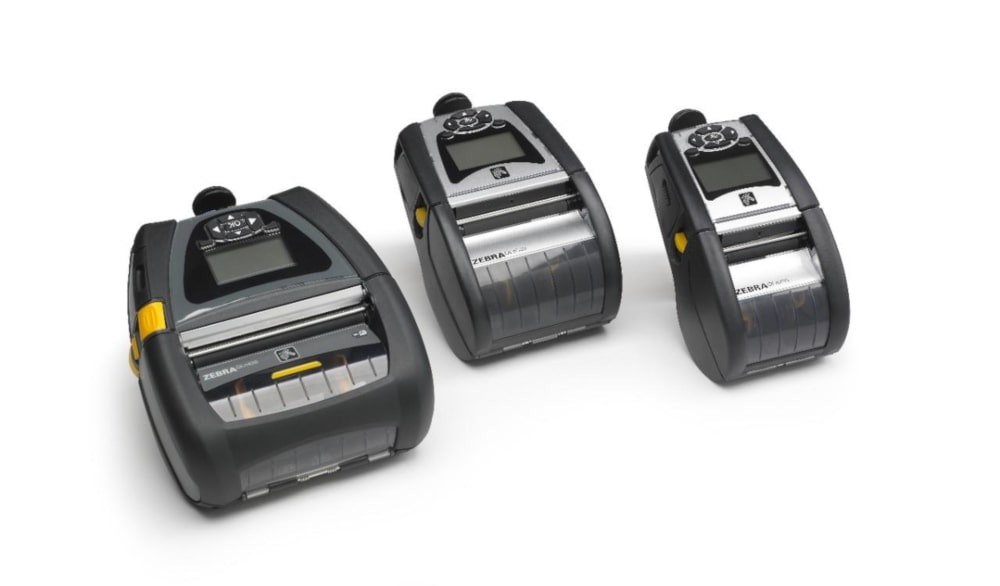
portable-printers

portable-printers

The QLn220 is a semi rugged mobile direct thermal printer designed to allow you to print product labels on the shop floor without needing to queue labels and return to the office to print.

The QLn220 works seamlessly with the Zebra Workabout Pro to print product labels and price reduction labels.

There is no need to purchase any other software as the label formats are preloaded in the system.

Both the QLn220 and the Workabout Pro can be added easily to your existing Wi-Fi network and both support the latest security and encryption standards.

If labels are required for permanent outdoor use then they can be queued up on the Work About Pro and printed on a heavy duty desktop printer when ready.

The Work About Pro has been used by Open Retail Solutions for over 10 years and over 150 units have been installed at various customer sites including Garden Centres, Plant Nurseries, Farm Shops and Delicatessens.

There are various standard size labels that are available for the QLn220 printer, each have their own uses, including shelf edge labels, product labels and pre-perforated split labels that can be used for price reductions.

Colour can also be used on the labels to highlight prices.

Zebra can quote for custom labels to any size and use of your own company colours so please ask us for a quote and this can be arranged free of charge.

Alternatively you can source your own custom labels from your existing label suppliers if the QLn220 is supported by them.

Various accessories are available for the QLn220 printer.

A belt clip and shoulder strap are included as standard, but you can also add a carry case for harder working conditions and also a docking station to charge the printer, rather than using the AC adapter directly.

Spare batteries can also be purchased to maximise up time on the shop floor.

A micro USB cable is required to connect the printer to a PC for setup and diagnostics.

Adding a Zebra QLn220 mobile printer to your infrastructure will make your workforce truly mobile.

For more information on our EPoS solution please visit our website at http://www.openretailsolutions.co.uk or contact one of our sales team on 0115 9677 439.